> ## Documentation Index
> Fetch the complete documentation index at: https://docs.cloudcruise.com/llms.txt
> Use this file to discover all available pages before exploring further.
# Maintenance Agent
> Understand, recover, and repair workflow failures
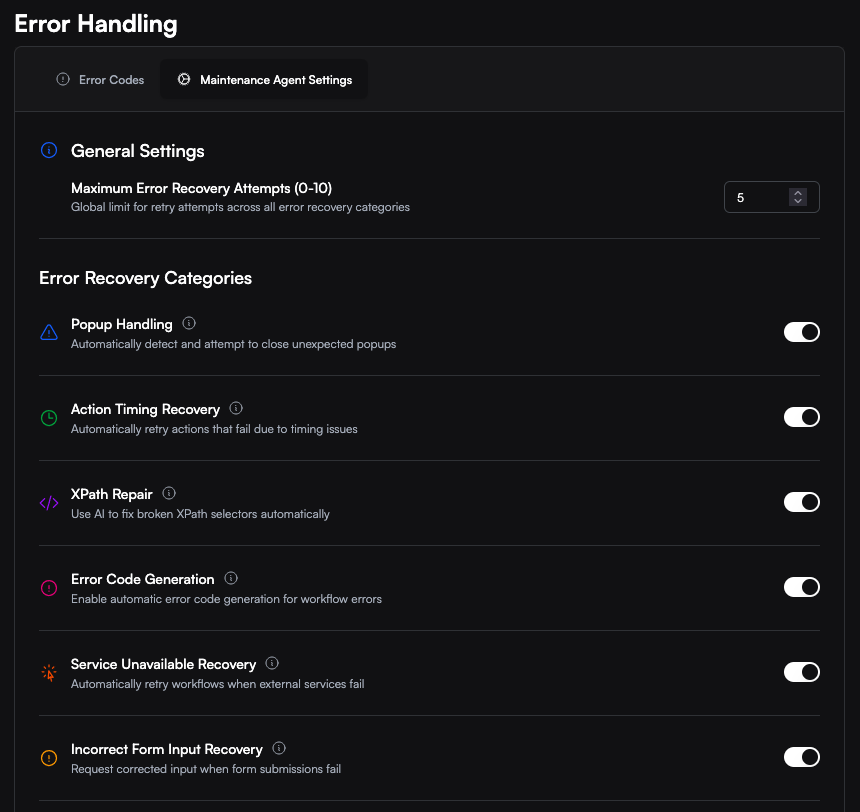 The Maintenance Agent is CloudCruise's failure-diagnosis and recovery layer. When a workflow action fails, it explains what happened and chooses the safest next step: recover in place, request input, retry later, notify your team, or hand the failure to the Builder Agent.
You can control recovery behavior at the workspace and workflow levels under **Error Handling > Maintenance Agent Settings**. Workspace settings determine which workflow-level recovery controls are available in the dashboard.
## What you can do
| Customer outcome | What CloudCruise provides |
| ------------------------------- | -------------------------------------------------------------------------------------------------------------- |
| Understand what failed | A category, sub-type, plain-language explanation, failing step, and captured run context |
| Recover automatically | Popup, XPath, page-loading, password, 2FA, outage, and logged-out-session recovery |
| Ask for help safely | Webhooks that request corrected data instead of making consequential choices |
| Repair the workflow | Manual XPath correction, Edit Workflow, and Fix with Builder Agent |
| Control recovery | Workspace and workflow settings, retry limits, popup XPaths, and approved error-code actions |
| See what the agent accomplished | Recovered status, recovered error IDs, requeue events, screenshots, video context, and eligible monthly recaps |
| Improve recovery over time | Node Description Enrichment, workflow descriptions, and approved error-code suggestions |
## Understand what failed
The Maintenance Agent evaluates more than the raw error message. Depending on the failure, it can use the error screenshot, visible page state, DOM and selector signals, current URL, failing step, recent actions, context from successful runs, and patterns from previous failed runs. It also learns from recovery outcomes and can apply site-specific knowledge about recurring timing, selector, popup, validation, login, and outage behavior.
The resulting category, sub-type, and explanation are available in the [Retrieve Run Results](/run-api/retrieve-run-results) response as `llm_error_category`, `llm_error_sub_type`, and `llm_error_description`. Terminal failures also include them in the [`execution.failed`](/concepts/webhooks) webhook.
### Error-classification matrix
| Category | Sub-types | Customer meaning |
| -------------------------- | --------------------------------------------------------------------------------------------------------------------------------------------------------------- | -------------------------------------------------------------------------------- |
| `AUTHENTICATION_ERROR` | `INVALID_CREDENTIALS`, `MFA_CODE_REJECTED`, `TFA_SETUP_REQUIRED`, `ACCOUNT_LOCKED`, `SILENT_LOGIN_FAILURE`, `ACCESS_DENIED`, `OTHER` | Login, verification, credentials, or account access failed |
| `INCORRECT_FORM_INPUTS` | `NO_MATCHING_OPTION`, `EMPTY_SELECTOR_VALUE`, `FIELD_VALIDATION_ERROR`, `UNRESOLVED_TEMPLATE`, `PAGINATION_MISSING`, `MULTIPLE_MATCHING_RESULTS_FOUND`, `OTHER` | An input is missing, invalid, rejected, unresolved, or ambiguous |
| `PASSWORD_UPDATE_REQUIRED` | `DISMISSIBLE`, `NON_DISMISSIBLE` | The site presented an optional or mandatory password-change screen |
| `PAGE_NOT_FOUND` | — | The requested page or record does not exist |
| `UNEXPECTED_UI_STATE` | `DISMISSIBLE`, `DECISION_REQUIRED` | A popup, dialog, overlay, or unexpected UI state blocked progress |
| `XPATH_INCORRECT` | `SELECTOR_NO_MATCH`, `AMBIGUOUS_MATCHES`, `SELECTOR_MISMATCH`, `TABLE_SELECTOR_MISMATCH`, `OTHER` | A selector found no element, multiple elements, or the wrong element shape |
| `UPSTREAM_ERROR` | `PREREQUISITE_NOT_MET`, `TIMING_RACE`, `TRANSIENT_SITE_ISSUE`, `SILENT_UPSTREAM_FAILURE`, `OTHER` | A prior site action did not produce the state required by the failing step |
| `SERVICE_UNAVAILABLE` | `APPLICATION_ERROR`, `ELEMENT_TIMEOUT`, `HTTP_ERROR`, `MAINTENANCE_DOWNTIME`, `SERVICE_RETIRED`, `OTHER` | The external application is unavailable, degraded, under maintenance, or retired |
| `PAGE_STILL_LOADING` | `SPINNER_VISIBLE`, `CONTENT_AREA_EMPTY`, `NAVIGATION_IN_PROGRESS`, `COMPONENT_LOADING`, `PARTIAL_PAGE_LOAD`, `LAZY_CONTENT_PENDING`, `OTHER` | The page or component had not finished loading |
| `ACCOUNT_LOGGED_OUT` | `SESSION_INVALIDATED`, `REDIRECTED_TO_LOGIN`, `SESSION_EXPIRED`, `OTHER` | A previously authenticated session was lost during the workflow |
Historical runs may retain legacy category names. Recovery routing continues to accept supported legacy values, so existing error-code mappings do not need to be rewritten.
## Recover automatically
### Popup Recovery
Popup Recovery handles unexpected dialogs, overlays, banners, and other blocking UI states without making consequential choices on your behalf.
* For a `DISMISSIBLE` blocker, the agent confirms that it is visible and uses a targeted action to close it. If the blocker is no longer present, the recovery action safely does nothing.
* For a `DECISION_REQUIRED` state, the agent requests input instead of choosing blindly. The request includes failure context and a screenshot when available.
Enable **Popup Handling** in Maintenance Agent Settings. You can also configure known dismiss controls with `popup_xpaths`; see [Workflow Settings](/concepts/workflow-dsl/workflow-settings#popup-handling).
### XPath Recovery
XPath Recovery handles eligible Click and Input Text steps when a selector no longer finds the intended element, matches multiple elements, or resolves to the wrong element shape.
The agent uses the current page, failed selector, match count, failure subtype, and step description to perform the intended action with AI and resume after the failed step. Recovery is bounded and stops safely when the required page context is unavailable or recent attempts for the same step have repeatedly failed.
Enable **XPath Recovery** in Maintenance Agent Settings. This runtime recovery does not guarantee that the workflow's stored selector will be permanently replaced.
### Page Loading Recovery
Page Loading Recovery handles actions that run before the relevant page or component is ready. It applies to Click, Input Text, Input Select, Scroll, Extract Datamodel, and App Action nodes.
| Page state | Initial temporary wait |
| --------------------------------------------------------------------- | ---------------------- |
| Component, partial-page, or lazy-content loading | 10 seconds |
| Spinner, empty content area, navigation, or other broad loading state | 15 seconds |
On the first eligible failure for a step, the agent injects a temporary Delay and retries the action. Attempts are tracked per step and session to prevent loops. If the retry still fails, the agent can retrace to an earlier eligible step when enough run context is available. A full requeue is the final fallback when Service Unavailable Recovery is enabled.
Page Loading Recovery is controlled by **Action Timing Recovery** (`enable_action_timing_recovery`). It is enabled by default but can be disabled at the workspace or workflow level.
### Password Update Recovery
Password Update Recovery handles password-expiration and mandatory-rotation screens while keeping the vault credential current.
1. The agent distinguishes an optional prompt from a mandatory password-change form.
2. Optional prompts can be dismissed.
3. For a mandatory update, the agent reads the current vault credential and visible password requirements.
4. It generates a compatible password, fills the required fields, and submits the form.
5. After success, it updates the vault and sends an [`execution.password_updated`](/concepts/webhooks) webhook.
6. The workflow resumes using the updated credential.
Enable **Password Update Recovery** in Maintenance Agent Settings or set `enable_password_update_recovery` through the [Workflow API](/workflow-api/update-workflow).
Automatic rotation requires exactly one vault credential on the workflow. When multiple credentials are present, CloudCruise does not guess which credential to rotate and sends a notification instead. Provider-backed credentials are written back to the connected provider; see the [1Password integration](/integrations/1password#password-rotation-write-back).
### 2FA Setup Recovery
2FA Setup Recovery can complete a required enrollment flow for the vault credential associated with the current site.
| Scenario | Recovery action |
| -------------------------------- | ---------------------------------------------------------------------------------------------------------------------------------------------------- |
| Method selection | Selects an available method, preferring authenticator, then email, then SMS |
| Authenticator setup | Reveals and validates the manual setup secret, stores it encrypted in the vault, and enters a current TOTP code |
| Existing authenticator challenge | Enters a code using the secret captured during the recovery flow |
| SMS verification | Requests and enters the verification code through the configured [CC 2FA Proxy](/concepts/twofactor#2-cc-2fa-proxy-hands-off-sms--email--magic-link) |
| Email verification | Requests and enters the verification code through the CC 2FA Proxy |
| Optional setup prompt | Dismisses the prompt or proceeds into setup when the screen requires that path |
Enable **TFA Setup Recovery** in Maintenance Agent Settings or set `enable_tfa_setup_recovery` through the [Workflow API](/workflow-api/update-workflow).
### Service and Logged-Out Session Recovery
Service Unavailable Recovery requeues transient external failures such as application errors, HTTP errors, timeouts, and active maintenance windows. A permanently retired service is reported but not retried.
Logged-out sessions use the same retry setting. When a site expires or invalidates a session during a workflow, CloudCruise notifies your configured channels and can requeue with stored cookies and browser state cleared, giving the next attempt a clean authentication path.
A silent login failure may also receive one bounded retry when retry recovery is enabled and the workflow has succeeded recently.
The retry delay follows `10 minutes × 2^n`, where `n` begins at 0, with ±20% jitter:
| Retry | Approximate delay |
| ----- | ----------------- |
| 1 | \~10 minutes |
| 2 | \~20 minutes |
| 3 | \~40 minutes |
| 4 | \~1.3 hours |
| 5 | \~2.7 hours |
| 6 | \~5.3 hours |
| 7 | \~10.7 hours |
| 8 | \~21 hours |
| 9 | \~1.8 days |
| 10 | \~3.5 days |
Enable **Service Unavailable Recovery** and set **Maximum Error Recovery Attempts** from 0 to 10. While waiting, the run status is `execution.requeued`. The corresponding webhook includes the retry attempt and scheduled execution time.
## Ask for help safely
### Incorrect Form Input Recovery
Incorrect Form Input Recovery lets your external agent or automation correct data without restarting the entire run.
1. The failure is classified as `INCORRECT_FORM_INPUTS`, or a matched error code uses **Request New Input**.
2. CloudCruise sends an [`execution.input_required`](/concepts/webhooks) webhook containing the session ID, current inputs, error details, timeout, and screenshot when available.
3. Your system calls `POST /run/{session_id}/new_input_variables` with corrected values.
4. CloudCruise resumes from the relevant step in the executed workflow path.
5. If no response arrives before the configured timeout, the run follows the normal failure path.
Enable **Incorrect Form Input Recovery** in Maintenance Agent Settings, or configure an approved error code with **Request New Input**. The workspace timeout can be set from 5 to 300 seconds. An active wait can be stopped with [Interrupt Run](/run-api/interrupt-run).
See [Submit New Input Variables](/run-api/submit-new-input-variables) for the complete request format.
### Consequential popup decisions
Decision-required popups use the same input-required lifecycle instead of being dismissed automatically. The webhook provides the current inputs, failure context, timeout, and a screenshot when available so your system can provide corrected values before the workflow resumes.
## Repair the workflow
Automatic recovery keeps the current run moving. When a workflow needs a permanent change, the run details page provides repair tools for members with the appropriate permissions:
* **Manual XPath correction** lets you review a suggested selector against the captured DOM and save a corrected workflow version.
* **Edit Workflow** opens the workflow directly for manual changes.
* **Fix with Builder Agent** starts an interactive repair session with the failed workflow, failing step, and run inputs already selected.
* **Adopt fix with Builder Agent** may appear to workspace admins for eligible repeated popup recoveries. Dismissible popups require a validated reusable selector; decision-required popups are handed to the Builder Agent without pinning a choice automatically.
## Control recovery behavior
Workspace settings establish the recovery controls available in the dashboard. Workflow settings let you tailor those controls for an individual workflow.
| Setting | API field | Default | Customer outcome |
| ----------------------------- | -------------------------------------- | ------- | ------------------------------------------------------------------ |
| Popup Handling | `enable_popup_handling` | `true` | Dismiss non-consequential popup blockers or request a decision |
| Action Timing Recovery | `enable_action_timing_recovery` | `true` | Wait and retry eligible actions when a page is still loading |
| XPath Recovery | `enable_xpath_recovery` | `true` | Use AI to complete eligible Click and Input Text selector failures |
| Error Code Generation | `enable_error_code_generation` | `true` | Suggest error codes for eligible unmatched failures |
| Node Description Enrichment | `enable_node_description_enrichment` | `false` | Generate diagnostic step descriptions from successful runs |
| Service Unavailable Recovery | `enable_service_unavailable_recovery` | `true` | Requeue transient outages and logged-out sessions |
| Incorrect Form Input Recovery | `enable_incorrect_form_input_recovery` | `false` | Request corrected data through a webhook |
| Password Update Recovery | `enable_password_update_recovery` | `false` | Rotate one compatible vault credential and resume |
| TFA Setup Recovery | `enable_tfa_setup_recovery` | `false` | Complete supported 2FA enrollment flows |
See [Workflow Settings](/concepts/workflow-dsl/workflow-settings#recovery-toggles) for the complete API-field reference.
## See what the agent accomplished
Run details distinguish failures that were recovered from failures that still need intervention. Recovered rows show the affected step and can link to the corresponding point in the run video when a recording is available.
The [Retrieve Run Results](/run-api/retrieve-run-results) response includes:
* `was_recovered` — whether at least one Maintenance Agent recovery succeeded
* `recovered_error_ids` — the recovered error IDs, correlated with the response's `errors` array
Lifecycle webhooks expose the same operational journey:
| Event | Meaning |
| ---------------------------- | ------------------------------------------------------------- |
| `execution.requeued` | The run is waiting for another attempt |
| `execution.input_required` | CloudCruise is waiting for corrected data or a popup decision |
| `execution.password_updated` | Password rotation succeeded and the credential was updated |
| `execution.failed` | The run reached its terminal failure path |
Eligible organizations may also receive a monthly recap summarizing recovered popup blockers, selector failures, outages, slow-loading pages, password updates, and 2FA setup. Delivery depends on organization eligibility and minimum recovery volume.
## Improve recovery over time
### Node Description Enrichment
Clear step intent helps the Maintenance Agent distinguish selector drift, timing problems, missing prerequisites, and unexpected page states. Node Description Enrichment creates that context for workflows that opt in.
1. The enrichment cycle prioritizes enabled workflows with frequent failures and limited diagnostic context.
2. It uses screenshots from a recent successful, non-retried run.
3. Eligible steps with missing or short descriptions receive a 2–3 sentence diagnostic description and structured intent.
4. Descriptions are saved in a new workflow version and used during future diagnoses.
5. A missing or short workflow description can also be generated from the enriched steps.
Enable **Node Description Enrichment** in Maintenance Agent Settings. Descriptions under 30 characters are eligible. Control-flow nodes such as Start, End, Delay, Loop, and Bool Condition are skipped.
### Error code suggestions
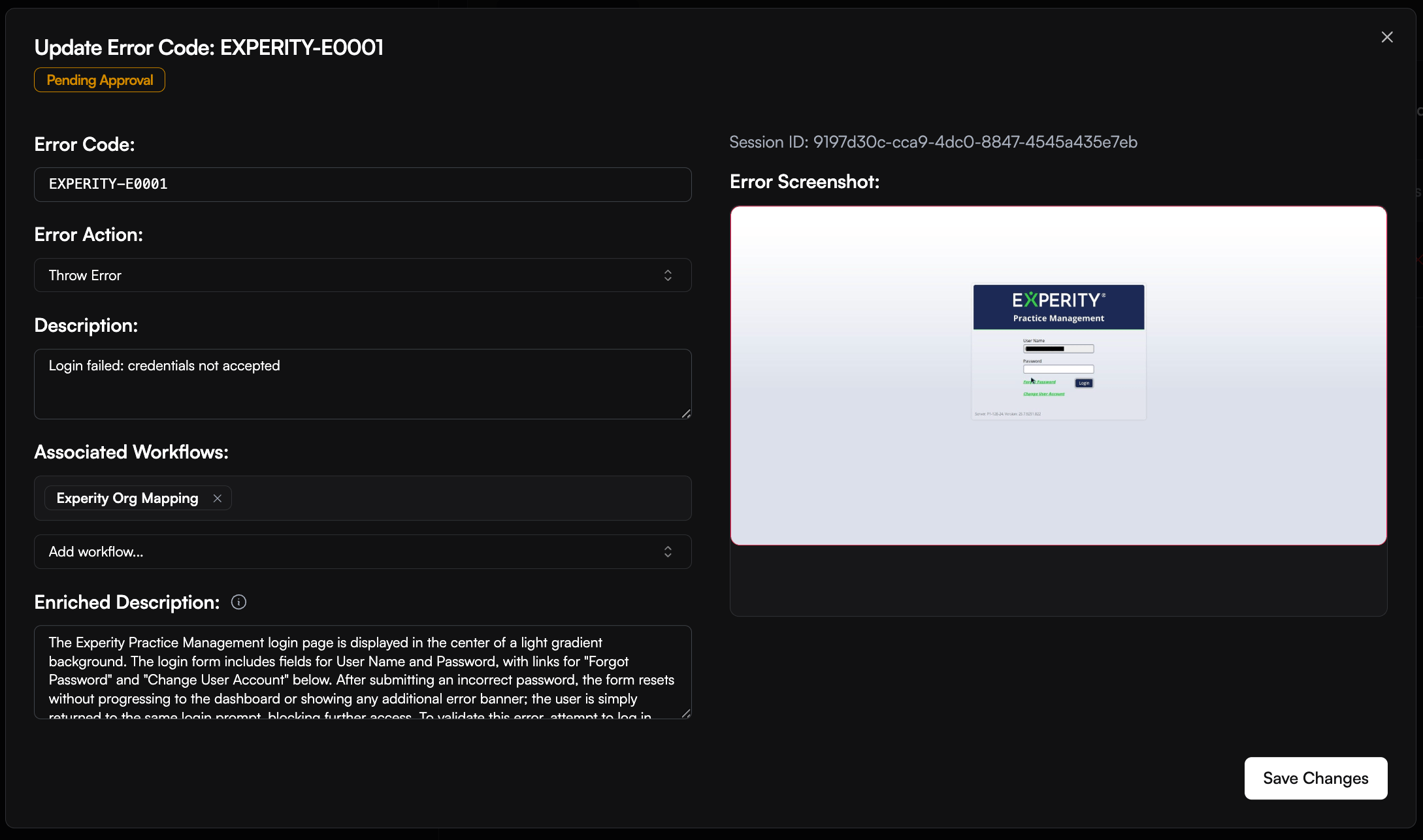
For authentication, password-update, and incorrect-input failures, the Maintenance Agent can compare its diagnosis with your approved workspace error codes. When no code matches and Error Code Generation is enabled, it creates a pending suggestion for review instead of silently approving a new code.
After approval under **Error Handling > Error Codes**, future matching failures can return the code in run results and `execution.failed` webhooks. Approved error codes can also define actions such as fail and notify, retry, pause, cancel queued runs using the same authentication, or request corrected input.
The Maintenance Agent is CloudCruise's failure-diagnosis and recovery layer. When a workflow action fails, it explains what happened and chooses the safest next step: recover in place, request input, retry later, notify your team, or hand the failure to the Builder Agent.
You can control recovery behavior at the workspace and workflow levels under **Error Handling > Maintenance Agent Settings**. Workspace settings determine which workflow-level recovery controls are available in the dashboard.
## What you can do
| Customer outcome | What CloudCruise provides |
| ------------------------------- | -------------------------------------------------------------------------------------------------------------- |
| Understand what failed | A category, sub-type, plain-language explanation, failing step, and captured run context |
| Recover automatically | Popup, XPath, page-loading, password, 2FA, outage, and logged-out-session recovery |
| Ask for help safely | Webhooks that request corrected data instead of making consequential choices |
| Repair the workflow | Manual XPath correction, Edit Workflow, and Fix with Builder Agent |
| Control recovery | Workspace and workflow settings, retry limits, popup XPaths, and approved error-code actions |
| See what the agent accomplished | Recovered status, recovered error IDs, requeue events, screenshots, video context, and eligible monthly recaps |
| Improve recovery over time | Node Description Enrichment, workflow descriptions, and approved error-code suggestions |
## Understand what failed
The Maintenance Agent evaluates more than the raw error message. Depending on the failure, it can use the error screenshot, visible page state, DOM and selector signals, current URL, failing step, recent actions, context from successful runs, and patterns from previous failed runs. It also learns from recovery outcomes and can apply site-specific knowledge about recurring timing, selector, popup, validation, login, and outage behavior.
The resulting category, sub-type, and explanation are available in the [Retrieve Run Results](/run-api/retrieve-run-results) response as `llm_error_category`, `llm_error_sub_type`, and `llm_error_description`. Terminal failures also include them in the [`execution.failed`](/concepts/webhooks) webhook.
### Error-classification matrix
| Category | Sub-types | Customer meaning |
| -------------------------- | --------------------------------------------------------------------------------------------------------------------------------------------------------------- | -------------------------------------------------------------------------------- |
| `AUTHENTICATION_ERROR` | `INVALID_CREDENTIALS`, `MFA_CODE_REJECTED`, `TFA_SETUP_REQUIRED`, `ACCOUNT_LOCKED`, `SILENT_LOGIN_FAILURE`, `ACCESS_DENIED`, `OTHER` | Login, verification, credentials, or account access failed |
| `INCORRECT_FORM_INPUTS` | `NO_MATCHING_OPTION`, `EMPTY_SELECTOR_VALUE`, `FIELD_VALIDATION_ERROR`, `UNRESOLVED_TEMPLATE`, `PAGINATION_MISSING`, `MULTIPLE_MATCHING_RESULTS_FOUND`, `OTHER` | An input is missing, invalid, rejected, unresolved, or ambiguous |
| `PASSWORD_UPDATE_REQUIRED` | `DISMISSIBLE`, `NON_DISMISSIBLE` | The site presented an optional or mandatory password-change screen |
| `PAGE_NOT_FOUND` | — | The requested page or record does not exist |
| `UNEXPECTED_UI_STATE` | `DISMISSIBLE`, `DECISION_REQUIRED` | A popup, dialog, overlay, or unexpected UI state blocked progress |
| `XPATH_INCORRECT` | `SELECTOR_NO_MATCH`, `AMBIGUOUS_MATCHES`, `SELECTOR_MISMATCH`, `TABLE_SELECTOR_MISMATCH`, `OTHER` | A selector found no element, multiple elements, or the wrong element shape |
| `UPSTREAM_ERROR` | `PREREQUISITE_NOT_MET`, `TIMING_RACE`, `TRANSIENT_SITE_ISSUE`, `SILENT_UPSTREAM_FAILURE`, `OTHER` | A prior site action did not produce the state required by the failing step |
| `SERVICE_UNAVAILABLE` | `APPLICATION_ERROR`, `ELEMENT_TIMEOUT`, `HTTP_ERROR`, `MAINTENANCE_DOWNTIME`, `SERVICE_RETIRED`, `OTHER` | The external application is unavailable, degraded, under maintenance, or retired |
| `PAGE_STILL_LOADING` | `SPINNER_VISIBLE`, `CONTENT_AREA_EMPTY`, `NAVIGATION_IN_PROGRESS`, `COMPONENT_LOADING`, `PARTIAL_PAGE_LOAD`, `LAZY_CONTENT_PENDING`, `OTHER` | The page or component had not finished loading |
| `ACCOUNT_LOGGED_OUT` | `SESSION_INVALIDATED`, `REDIRECTED_TO_LOGIN`, `SESSION_EXPIRED`, `OTHER` | A previously authenticated session was lost during the workflow |
Historical runs may retain legacy category names. Recovery routing continues to accept supported legacy values, so existing error-code mappings do not need to be rewritten.
## Recover automatically
### Popup Recovery
Popup Recovery handles unexpected dialogs, overlays, banners, and other blocking UI states without making consequential choices on your behalf.
* For a `DISMISSIBLE` blocker, the agent confirms that it is visible and uses a targeted action to close it. If the blocker is no longer present, the recovery action safely does nothing.
* For a `DECISION_REQUIRED` state, the agent requests input instead of choosing blindly. The request includes failure context and a screenshot when available.
Enable **Popup Handling** in Maintenance Agent Settings. You can also configure known dismiss controls with `popup_xpaths`; see [Workflow Settings](/concepts/workflow-dsl/workflow-settings#popup-handling).
### XPath Recovery
XPath Recovery handles eligible Click and Input Text steps when a selector no longer finds the intended element, matches multiple elements, or resolves to the wrong element shape.
The agent uses the current page, failed selector, match count, failure subtype, and step description to perform the intended action with AI and resume after the failed step. Recovery is bounded and stops safely when the required page context is unavailable or recent attempts for the same step have repeatedly failed.
Enable **XPath Recovery** in Maintenance Agent Settings. This runtime recovery does not guarantee that the workflow's stored selector will be permanently replaced.
### Page Loading Recovery
Page Loading Recovery handles actions that run before the relevant page or component is ready. It applies to Click, Input Text, Input Select, Scroll, Extract Datamodel, and App Action nodes.
| Page state | Initial temporary wait |
| --------------------------------------------------------------------- | ---------------------- |
| Component, partial-page, or lazy-content loading | 10 seconds |
| Spinner, empty content area, navigation, or other broad loading state | 15 seconds |
On the first eligible failure for a step, the agent injects a temporary Delay and retries the action. Attempts are tracked per step and session to prevent loops. If the retry still fails, the agent can retrace to an earlier eligible step when enough run context is available. A full requeue is the final fallback when Service Unavailable Recovery is enabled.
Page Loading Recovery is controlled by **Action Timing Recovery** (`enable_action_timing_recovery`). It is enabled by default but can be disabled at the workspace or workflow level.
### Password Update Recovery
Password Update Recovery handles password-expiration and mandatory-rotation screens while keeping the vault credential current.
1. The agent distinguishes an optional prompt from a mandatory password-change form.
2. Optional prompts can be dismissed.
3. For a mandatory update, the agent reads the current vault credential and visible password requirements.
4. It generates a compatible password, fills the required fields, and submits the form.
5. After success, it updates the vault and sends an [`execution.password_updated`](/concepts/webhooks) webhook.
6. The workflow resumes using the updated credential.
Enable **Password Update Recovery** in Maintenance Agent Settings or set `enable_password_update_recovery` through the [Workflow API](/workflow-api/update-workflow).
Automatic rotation requires exactly one vault credential on the workflow. When multiple credentials are present, CloudCruise does not guess which credential to rotate and sends a notification instead. Provider-backed credentials are written back to the connected provider; see the [1Password integration](/integrations/1password#password-rotation-write-back).
### 2FA Setup Recovery
2FA Setup Recovery can complete a required enrollment flow for the vault credential associated with the current site.
| Scenario | Recovery action |
| -------------------------------- | ---------------------------------------------------------------------------------------------------------------------------------------------------- |
| Method selection | Selects an available method, preferring authenticator, then email, then SMS |
| Authenticator setup | Reveals and validates the manual setup secret, stores it encrypted in the vault, and enters a current TOTP code |
| Existing authenticator challenge | Enters a code using the secret captured during the recovery flow |
| SMS verification | Requests and enters the verification code through the configured [CC 2FA Proxy](/concepts/twofactor#2-cc-2fa-proxy-hands-off-sms--email--magic-link) |
| Email verification | Requests and enters the verification code through the CC 2FA Proxy |
| Optional setup prompt | Dismisses the prompt or proceeds into setup when the screen requires that path |
Enable **TFA Setup Recovery** in Maintenance Agent Settings or set `enable_tfa_setup_recovery` through the [Workflow API](/workflow-api/update-workflow).
### Service and Logged-Out Session Recovery
Service Unavailable Recovery requeues transient external failures such as application errors, HTTP errors, timeouts, and active maintenance windows. A permanently retired service is reported but not retried.
Logged-out sessions use the same retry setting. When a site expires or invalidates a session during a workflow, CloudCruise notifies your configured channels and can requeue with stored cookies and browser state cleared, giving the next attempt a clean authentication path.
A silent login failure may also receive one bounded retry when retry recovery is enabled and the workflow has succeeded recently.
The retry delay follows `10 minutes × 2^n`, where `n` begins at 0, with ±20% jitter:
| Retry | Approximate delay |
| ----- | ----------------- |
| 1 | \~10 minutes |
| 2 | \~20 minutes |
| 3 | \~40 minutes |
| 4 | \~1.3 hours |
| 5 | \~2.7 hours |
| 6 | \~5.3 hours |
| 7 | \~10.7 hours |
| 8 | \~21 hours |
| 9 | \~1.8 days |
| 10 | \~3.5 days |
Enable **Service Unavailable Recovery** and set **Maximum Error Recovery Attempts** from 0 to 10. While waiting, the run status is `execution.requeued`. The corresponding webhook includes the retry attempt and scheduled execution time.
## Ask for help safely
### Incorrect Form Input Recovery
Incorrect Form Input Recovery lets your external agent or automation correct data without restarting the entire run.
1. The failure is classified as `INCORRECT_FORM_INPUTS`, or a matched error code uses **Request New Input**.
2. CloudCruise sends an [`execution.input_required`](/concepts/webhooks) webhook containing the session ID, current inputs, error details, timeout, and screenshot when available.
3. Your system calls `POST /run/{session_id}/new_input_variables` with corrected values.
4. CloudCruise resumes from the relevant step in the executed workflow path.
5. If no response arrives before the configured timeout, the run follows the normal failure path.
Enable **Incorrect Form Input Recovery** in Maintenance Agent Settings, or configure an approved error code with **Request New Input**. The workspace timeout can be set from 5 to 300 seconds. An active wait can be stopped with [Interrupt Run](/run-api/interrupt-run).
See [Submit New Input Variables](/run-api/submit-new-input-variables) for the complete request format.
### Consequential popup decisions
Decision-required popups use the same input-required lifecycle instead of being dismissed automatically. The webhook provides the current inputs, failure context, timeout, and a screenshot when available so your system can provide corrected values before the workflow resumes.
## Repair the workflow
Automatic recovery keeps the current run moving. When a workflow needs a permanent change, the run details page provides repair tools for members with the appropriate permissions:
* **Manual XPath correction** lets you review a suggested selector against the captured DOM and save a corrected workflow version.
* **Edit Workflow** opens the workflow directly for manual changes.
* **Fix with Builder Agent** starts an interactive repair session with the failed workflow, failing step, and run inputs already selected.
* **Adopt fix with Builder Agent** may appear to workspace admins for eligible repeated popup recoveries. Dismissible popups require a validated reusable selector; decision-required popups are handed to the Builder Agent without pinning a choice automatically.
## Control recovery behavior
Workspace settings establish the recovery controls available in the dashboard. Workflow settings let you tailor those controls for an individual workflow.
| Setting | API field | Default | Customer outcome |
| ----------------------------- | -------------------------------------- | ------- | ------------------------------------------------------------------ |
| Popup Handling | `enable_popup_handling` | `true` | Dismiss non-consequential popup blockers or request a decision |
| Action Timing Recovery | `enable_action_timing_recovery` | `true` | Wait and retry eligible actions when a page is still loading |
| XPath Recovery | `enable_xpath_recovery` | `true` | Use AI to complete eligible Click and Input Text selector failures |
| Error Code Generation | `enable_error_code_generation` | `true` | Suggest error codes for eligible unmatched failures |
| Node Description Enrichment | `enable_node_description_enrichment` | `false` | Generate diagnostic step descriptions from successful runs |
| Service Unavailable Recovery | `enable_service_unavailable_recovery` | `true` | Requeue transient outages and logged-out sessions |
| Incorrect Form Input Recovery | `enable_incorrect_form_input_recovery` | `false` | Request corrected data through a webhook |
| Password Update Recovery | `enable_password_update_recovery` | `false` | Rotate one compatible vault credential and resume |
| TFA Setup Recovery | `enable_tfa_setup_recovery` | `false` | Complete supported 2FA enrollment flows |
See [Workflow Settings](/concepts/workflow-dsl/workflow-settings#recovery-toggles) for the complete API-field reference.
## See what the agent accomplished
Run details distinguish failures that were recovered from failures that still need intervention. Recovered rows show the affected step and can link to the corresponding point in the run video when a recording is available.
The [Retrieve Run Results](/run-api/retrieve-run-results) response includes:
* `was_recovered` — whether at least one Maintenance Agent recovery succeeded
* `recovered_error_ids` — the recovered error IDs, correlated with the response's `errors` array
Lifecycle webhooks expose the same operational journey:
| Event | Meaning |
| ---------------------------- | ------------------------------------------------------------- |
| `execution.requeued` | The run is waiting for another attempt |
| `execution.input_required` | CloudCruise is waiting for corrected data or a popup decision |
| `execution.password_updated` | Password rotation succeeded and the credential was updated |
| `execution.failed` | The run reached its terminal failure path |
Eligible organizations may also receive a monthly recap summarizing recovered popup blockers, selector failures, outages, slow-loading pages, password updates, and 2FA setup. Delivery depends on organization eligibility and minimum recovery volume.
## Improve recovery over time
### Node Description Enrichment
Clear step intent helps the Maintenance Agent distinguish selector drift, timing problems, missing prerequisites, and unexpected page states. Node Description Enrichment creates that context for workflows that opt in.
1. The enrichment cycle prioritizes enabled workflows with frequent failures and limited diagnostic context.
2. It uses screenshots from a recent successful, non-retried run.
3. Eligible steps with missing or short descriptions receive a 2–3 sentence diagnostic description and structured intent.
4. Descriptions are saved in a new workflow version and used during future diagnoses.
5. A missing or short workflow description can also be generated from the enriched steps.
Enable **Node Description Enrichment** in Maintenance Agent Settings. Descriptions under 30 characters are eligible. Control-flow nodes such as Start, End, Delay, Loop, and Bool Condition are skipped.
### Error code suggestions
For authentication, password-update, and incorrect-input failures, the Maintenance Agent can compare its diagnosis with your approved workspace error codes. When no code matches and Error Code Generation is enabled, it creates a pending suggestion for review instead of silently approving a new code.
After approval under **Error Handling > Error Codes**, future matching failures can return the code in run results and `execution.failed` webhooks. Approved error codes can also define actions such as fail and notify, retry, pause, cancel queued runs using the same authentication, or request corrected input.